Image gallery
BlackmaticRecoilTrainer
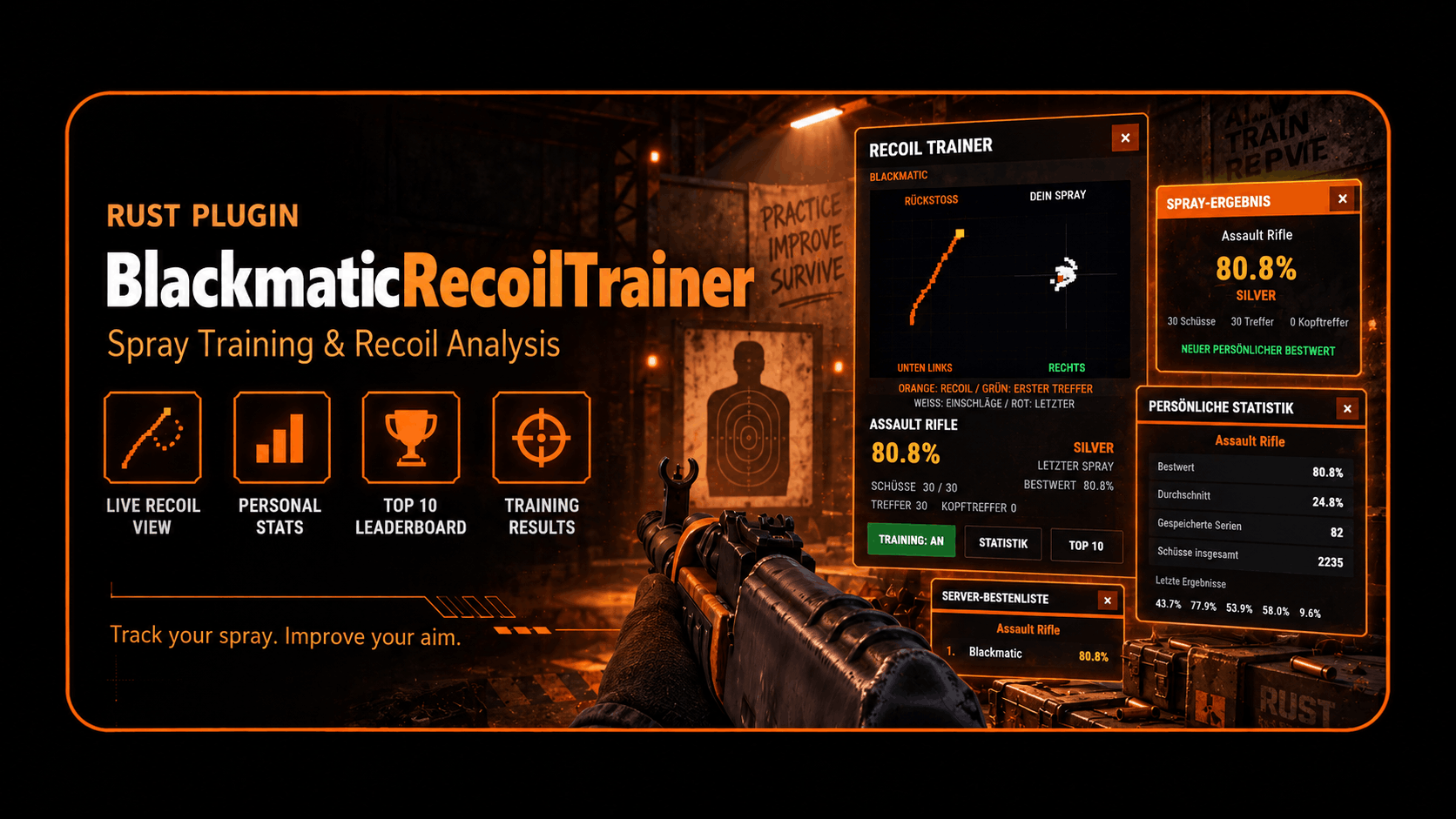
Understand recoil, practice spray control, and improve your personal bests directly on your Rust server. An in-game recoil trainer with recorded weapon patterns, live impact visualization, spray scoring, personal statistics, leaderboards, and admin observation.
Registered users can report plugin problems directly from this page.
Description
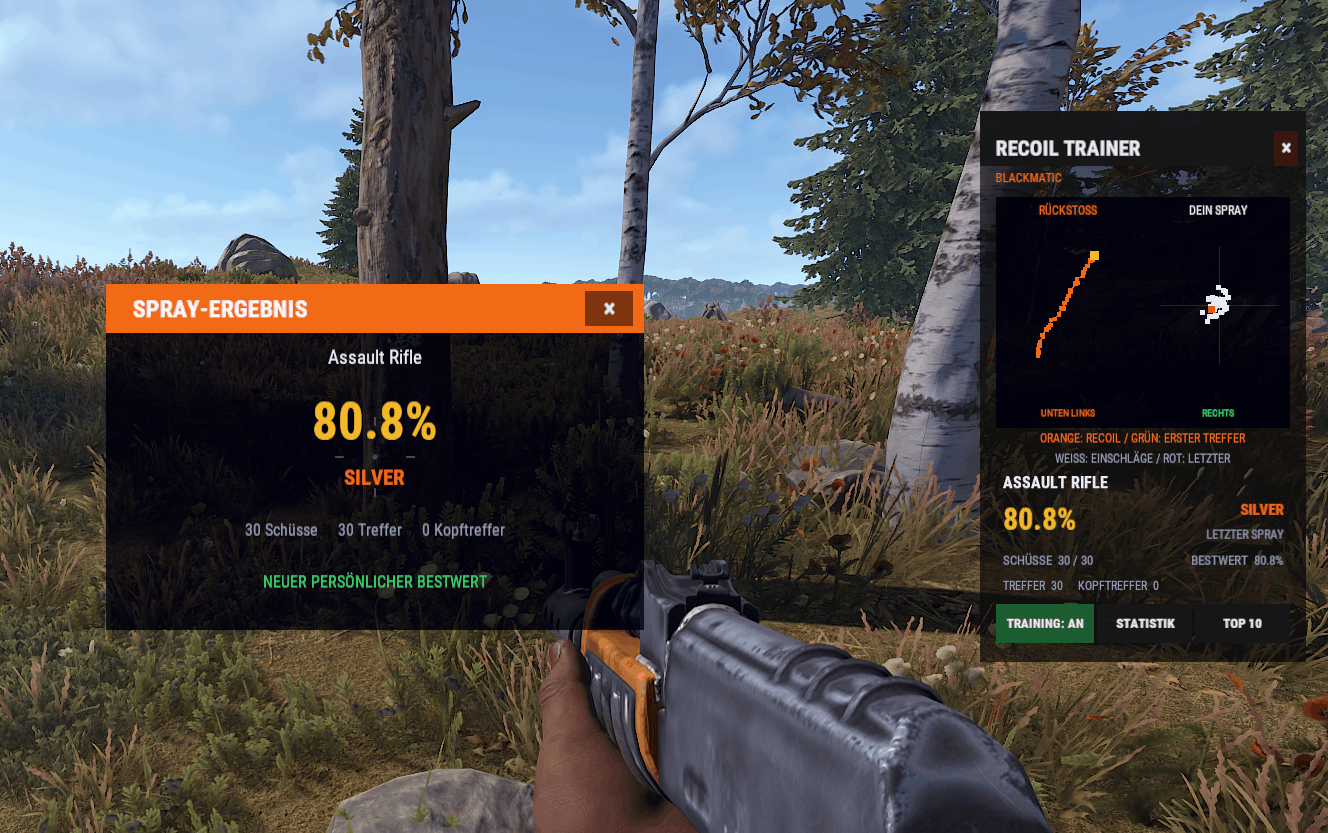
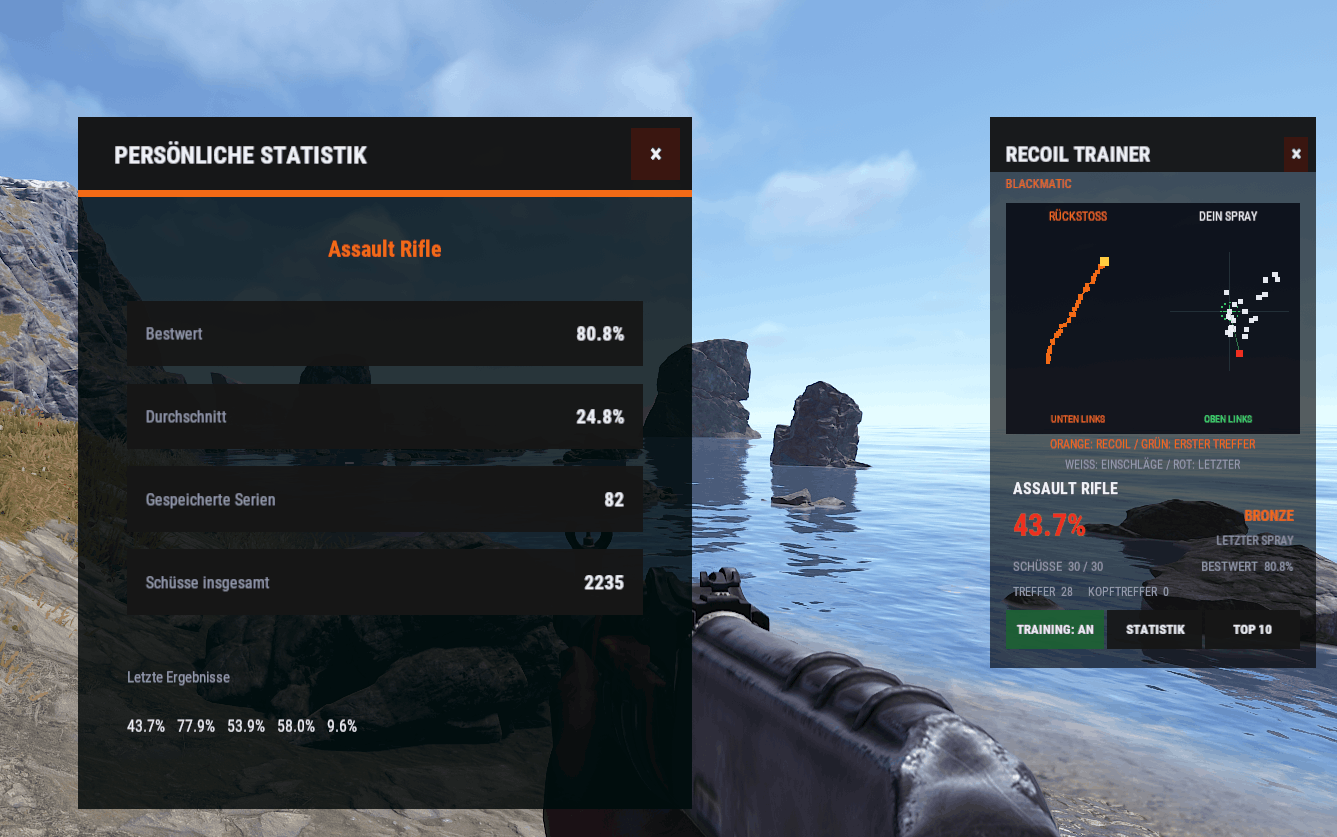
The HUD provides two separate views: the left side displays the weapon’s recoil pattern recorded by an admin, while the right side shows confirmed impacts from your current spray. White dots represent your shot grouping, and red marks the latest confirmed shot. A green target marks the first confirmed impact and stays fixed throughout the spray.
This helps players see how tightly they control their shots and which direction their spray drifts. Directional hints assist with corrections, while percentage scores, personal bests, and leaderboards make results easy to compare.
The plugin is suitable for training areas, aim training servers, or an additional practice feature on your Rust server.
Features
- In-game HUD with separate recoil pattern and shot grouping views
- Current shot marker on the recorded weapon pattern
- Fixed target point for each spray
- Colored impact markers with the latest confirmed shot highlighted
- Directional correction hints
- Percentage scoring based on deviation from the target point
- Training mode with a result window after each spray
- Configurable ranks from Bronze to Master
- Personal bests and statistics for each weapon
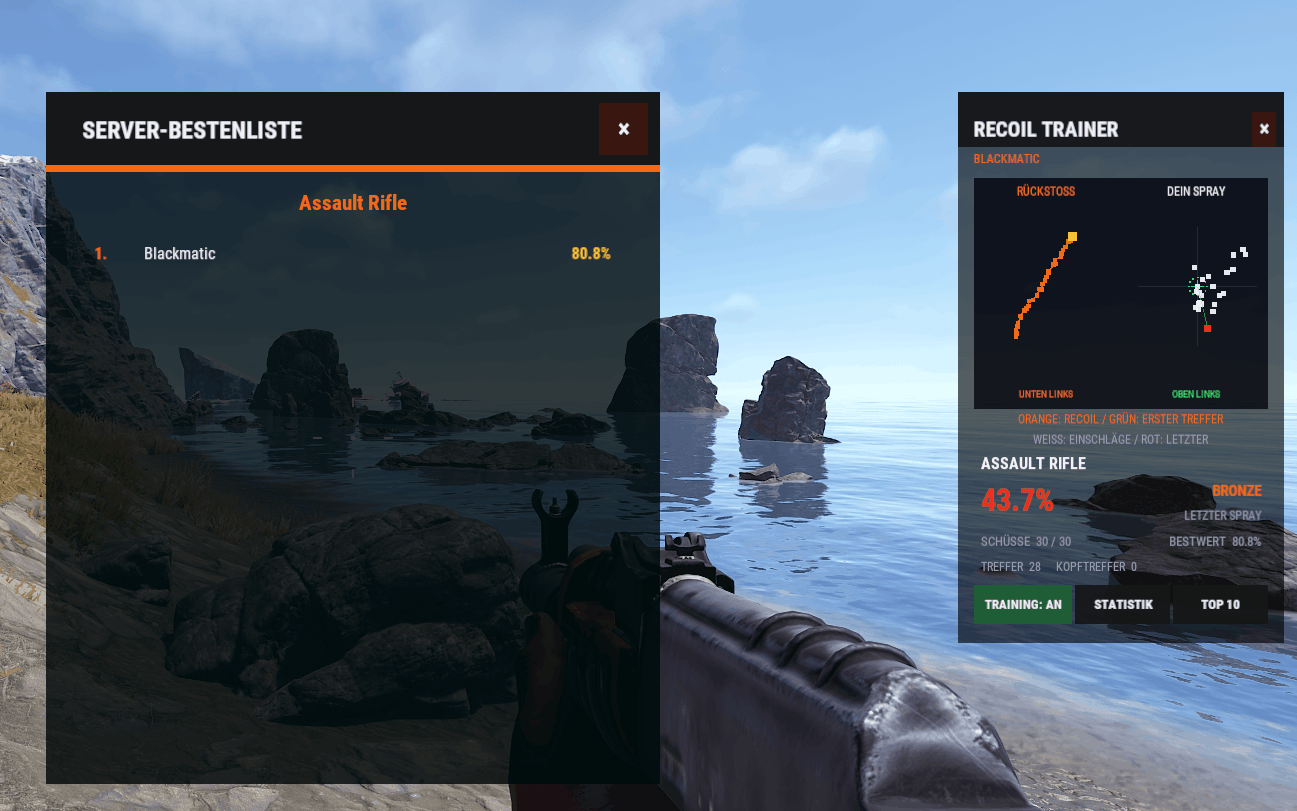
- Weapon-specific server leaderboards
- Shot, hit, and headshot counters
- Custom reference pattern recording for admins
- Admin HUD for observing another player’s spray
- Multiple admins can observe the same player
- Configurable HUD position, size, and colors
- English and German language files
- Separate player and admin permissions
- Persistent statistics and weapon pattern storage
- Supported Weapons
- Assault Rifle, LR-300, MP5A4, Thompson, Custom SMG, M249, HMLMG, M39, and Semi-Automatic Rifle.
- Reference patterns are recorded on your server.
Commands
Player CommandsCommand Function/recoil Toggle the HUD/recoil on Enable the HUD/recoil off Close trainer windows and stop training and observation/recoil training Toggle training mode/recoil stats Open personal weapon statistics/recoil top Open the weapon leaderboard/recoil weapons List enabled weapons/recoil help Display command helpAdmin Commands/recoil record start Start recording a reference pattern for the equipped weapon/recoil record stop Save a complete recording/recoil record cancel Discard the current recording/suspect PlayerName Observe a player’s spray in your own HUD/suspect off Stop observing
Permissions
Allow all players to use the trainer through the server console:oxide.grant group default blackmaticrecoiltrainer.useGrant admin features to a specific user:oxide.grant user STEAMID blackmaticrecoiltrainer.admin
Installation
Upload BlackmaticRecoilTrainer.cs to oxide/plugins.
Adjust the automatically generated configuration as needed.
Assign player and admin permissions.
Record a reference pattern for each weapon you want to use.
To record a pattern, equip the weapon and enter /recoil record start. From a stationary position, fire a full magazine without compensating for recoil. Then enter /recoil record stop to save the recording.
An admin completes this setup once per weapon. All players then use the saved reference patterns.
To reload the plugin through the server console:
oxide.reload BlackmaticRecoilTrainer
Troubleshooting
For consistent results, shoot at a sufficiently large, flat wall while standing still. The spray view displays confirmed impacts, and the score measures their deviation from the first confirmed impact. It does not directly measure mouse movement.
The orange reference pattern is missing
An admin must record and save a complete magazine for that weapon.
No percentage score is displayed
A score appears once the first impact has been confirmed. Make sure your shots hit a surface.
Players cannot open the trainer
Check that they have the blackmaticrecoiltrainer.use permission and that the plugin is enabled in the configuration.
Compatibility
Game: Rust
Oxide / Carbon
Plugin file: BlackmaticRecoilTrainer.cs
Languages: English and German
Config preview
{
  "General": {
    "Enabled": true,
    "HUD enabled by default": true,
    "Automatically open HUD while holding a supported weapon": true,
    "Spray ends after this many seconds without a shot": 1.25,
    "Minimum shots required to save a score": 5,
    "Maximum stored recent sessions per player and weapon": 10,
    "Data autosave interval seconds": 120.0,
    "Use permission for normal players": true
  },
  "Scoring": {
    "Angular error in degrees that scores zero": 4.5,
    "Ignore natural aim movement below this angle": 0.06,
    "First shot always scores 100": true,
    "Require aiming down sights": false,
    "Include projectile hit statistics": true
  },
  "UI": {
    "Anchor minimum": "0.815 0.31",
    "Anchor maximum": "0.985 0.82",
    "Background color": "0.035 0.04 0.05 0.94",
    "Secondary background color": "0.075 0.082 0.095 0.98",
    "Accent color": "0.95 0.42 0.08 1",
    "Text color": "0.94 0.95 0.97 1",
    "Muted text color": "0.58 0.62 0.68 1",
    "Actual spray point color": "0.92 0.94 1 0.95",
    "Current shot color": "0.95 0.18 0.12 1",
    "Success color": "0.25 0.86 0.45 1",
    "Pattern point size pixels": 5.0,
    "Actual point size pixels": 6.0,
    "Maximum displayed pattern points": 40,
    "Aim graph range in degrees from the center": 5.0,
    "Show control buttons": true
  },
  "Supported weapons": {
    "rifle.ak": {
      "Enabled": true,
      "Display name": "Assault Rifle",
      "Expected magazine size": 30,
      "Pattern display scale": 6.0
    },
    "rifle.lr300": {
      "Enabled": true,
      "Display name": "LR-300 Assault Rifle",
      "Expected magazine size": 30,
      "Pattern display scale": 5.5
    },
    "smg.mp5": {
      "Enabled": true,
      "Display name": "MP5A4",
      "Expected magazine size": 30,
      "Pattern display scale": 4.8
    },
    "smg.thompson": {
      "Enabled": true,
      "Display name": "Thompson",
      "Expected magazine size": 20,
      "Pattern display scale": 4.5
    },
    "smg.2": {
      "Enabled": true,
      "Display name": "Custom SMG",
      "Expected magazine size": 24,
      "Pattern display scale": 5.0
    },
    "lmg.m249": {
      "Enabled": true,
      "Display name": "M249",
      "Expected magazine size": 100,
      "Pattern display scale": 7.0
    },
    "hmlmg": {
      "Enabled": true,
      "Display name": "HMLMG",
      "Expected magazine size": 60,
      "Pattern display scale": 7.0
    },
    "rifle.m39": {
      "Enabled": true,
      "Display name": "M39 Rifle",
      "Expected magazine size": 20,
      "Pattern display scale": 3.8
    },
    "rifle.semiauto": {
      "Enabled": true,
      "Display name": "Semi-Automatic Rifle",
      "Expected magazine size": 16,
      "Pattern display scale": 3.8
    }
  },
  "Training ranks (minimum score)": {
    "MASTER": 98.0,
    "DIAMOND": 95.0,
    "GOLD": 90.0,
    "SILVER": 80.0,
    "BRONZE": 0.0
  }
}Was this plugin useful?
Helpful: 0 | Needs work: 0